How to control Spotify's volume separately on your Mac
You put on some background music, and Spotify comes in twice as loud as everything else. So you reach for the volume keys, turn the whole Mac down, and now your call is too quiet and the video you were half-watching is a whisper. All you actually wanted was for Spotify to be a little quieter. On the Mac, that simple wish turns out to be surprisingly fiddly.
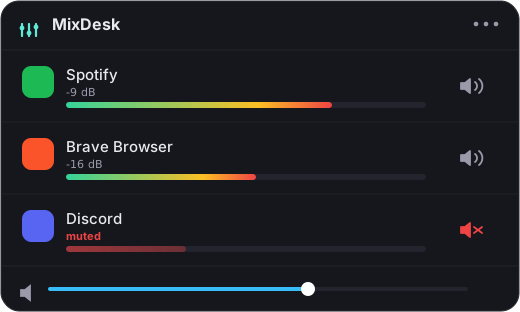
Spotify’s own volume vs. the system volume
There are really two volume controls in play, and they don’t talk to each other.
The first is Spotify’s in-app volume: the little slider down in the bottom-right of the Spotify window. It only affects Spotify, which is exactly what you want. The second is your Mac’s system volume, the one the keyboard keys and Control Center change, which affects everything at once.
So in theory you already have a way to make Spotify quieter without touching anything else: drag Spotify’s own slider down. The problem is what that costs you in practice.
Why the in-app slider is clumsy
To use Spotify’s slider you have to bring the Spotify window forward, find the tiny control near the volume icon, and nudge it by hand. If Spotify is minimized, or you’re deep in a game or a full-screen call, that’s a real interruption. You’re app-switching just to turn down some music.
It also doesn’t stick in a way that feels predictable. Set it to 30%, and then a track loudness difference or a podcast comes on louder anyway. When you want to bump it back up, you’re back to hunting for that same slider. There’s no quick, always-there control that says “Spotify, specifically, a bit quieter, right now.”
That’s the gap. Spotify can be quieter on its own, but the Mac gives you no fast, dedicated way to ride that level from wherever you happen to be working.
A dedicated Spotify slider in the menu bar
This is the one case where a per-app tool can give you a genuine, variable volume slider rather than just a mute. Spotify exposes its volume to scripting, so an app can read and set it directly. MixDesk uses that: it puts a Spotify volume slider right in your menu bar, so you can lower Spotify to, say, 40% without opening the app and without touching your system volume.
Because it’s driving Spotify’s own volume, the change is real and independent. Turn Spotify down and your call, your game, and your browser stay exactly where they were. Turn the system volume up later and Spotify keeps its relative place underneath it. You get the separate-slider behavior you were after, minus the window-hunting.
The same panel gives you transport controls for Spotify too: play, pause, next, and previous, without switching apps. So the common moves, like quieting it down or skipping a track, are all one click from the menu bar.
It’s worth being honest about how far this goes. This clean variable-volume trick works because Spotify (and Apple Music) let apps script their volume. For most other apps, macOS doesn’t expose a volume hook like that, so a per-app tool can show you a live level meter and instantly mute an app, but it can’t set an arbitrary app to 40%. Spotify is the happy case, which is lucky, because Spotify being too loud is one of the most common complaints there is.
What about the free and heavy options
You’ve got other routes, and they’re worth knowing.
You could just live with Spotify’s built-in slider. If you rarely change it, that’s genuinely fine, and it costs nothing. On the other end, SoundSource from Rogue Amoeba (around $47) gives every app a variable volume slider, not just music apps, plus audio routing and effects. It’s excellent and more powerful, but it’s also heavier and pricier than most people need if the real problem is just Spotify. There’s also Background Music, a free open-source option, though it can be finicky and isn’t actively maintained.
MixDesk sits in the simple middle: a native, menu-bar Spotify slider plus transport controls, meters for everything, and instant mute for any app, for $9 once. Everything runs on your Mac using Apple’s built-in audio API, so nothing about what you’re playing ever leaves the machine.
The short version
Spotify has its own volume, separate from your system volume, so you can make it quieter on its own, it’s just clumsy to reach. A menu-bar slider that drives Spotify’s scriptable volume, like MixDesk, gives you that separate control instantly, plus play/pause/skip, without switching apps. Two-week free trial, then $9 once.
Related reading
MixDesk does this for you
A menu-bar mixer with live meters and per-app mute. Free for 14 days.
Try MixDesk free