How to mute one app on a Mac without muting everything
Here’s the scenario. You’re listening to music, a browser tab starts autoplaying an ad, and you want the ad gone without stopping the song. On Windows you’d drag that one app to zero. On a Mac, the volume keys hit everything, so your only built-in move is to go find the offending thing and silence it by hand.
That’s doable. It’s just slower than it should be, and sometimes you can’t even tell which app is making the noise. Let’s go through the options.
Mute the tab or window directly
If the sound is coming from a browser, this is usually the quickest fix. In Safari, Chrome, and Brave, a little speaker icon shows up on any tab that’s playing audio. Click it to mute that tab. Chrome and Brave also let you right-click the tab and choose “Mute site,” which sticks.
For a regular app, look for a mute button inside it. Music and video players almost always have one. Discord and Zoom have per-call audio controls. The problem is the apps that have no mute at all, and the times when the sound is coming from something you didn’t even realize was open.
Quit or pause the app
Blunt, but it works. If an app is making noise you don’t want and you’re not using it, quitting it is a guaranteed mute. Not exactly elegant, and useless if you need the app running, but worth mentioning because people forget it’s an option.
Mute it from the menu bar with a mixer
This is the clean version of what you actually want: a single click that silences one app and leaves everything else untouched.
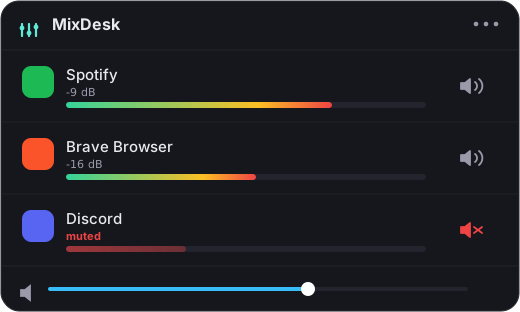
A per-app audio mixer puts every app that’s making sound in one list, each with its own mute button. MixDesk does exactly this. Open the menu, and you see Spotify, your browser, Discord, whatever’s playing, each with a live meter so you can spot the loud one instantly. Click the speaker next to it and that app goes silent while the rest keeps going. Click again to bring it back.
Under the hood it’s using the audio-tap API from macOS 14.2, which is Apple’s own supported way to read what an app is sending to your speakers. So muting is real and instant, and there’s no virtual audio driver wedged into your system to go wrong.
A note on mute versus pause
Muting an app is not the same as pausing it. A muted video keeps playing, you just don’t hear it. That’s usually what you want for an ad or a background stream. If you want it to actually stop, you still need to pause it inside the app. A mixer handles the situation where you just don’t want to hear something right now, which is most of them.
Related reading
- How to control the volume of individual apps on a Mac
- How to see which apps are using audio on your Mac
Frequently asked questions
Can I mute one app without muting the system volume?
Yes. A menu-bar mixer like MixDesk gives each app its own mute button, so you can silence one app and leave everything else playing at their normal volume, music and system sounds included.
Does muting an app stop it, or just silence it?
It just silences it. A muted video or stream keeps playing in the background; you simply don't hear it. If you want it to actually stop, you still need to pause it inside the app.
Which apps can I mute this way?
Any app that plays audio. MixDesk uses Apple's Core Audio process-tap API (macOS 14.2+) to divert an app's sound, so browsers, games, video players, and chat apps can all be muted individually, no per-app mute button required inside the app.
MixDesk does this for you
A menu-bar mixer with live meters and per-app mute. Free for 14 days.
Try MixDesk free