A Sound Control alternative for Mac
If you kept a Mac audio setup dialed in a few years ago, there’s a decent chance Sound Control was part of it. Static Z Software’s little menu-bar app gave every application its own volume slider and its own equalizer, and for a while it was one of the cleanest answers to the Mac’s missing volume mixer. Then, somewhere along the way, it went quiet. If you’re here because Sound Control won’t install, won’t buy, or just won’t behave on a modern Mac, let’s sort out what to do instead.
What Sound Control actually did
Credit where it’s due: Sound Control was genuinely good at its job. It put a real, variable volume fader on every running app, added a per-app equalizer so you could tame a harsh app or boost a quiet one, and handled audio balance, all from a tidy menu-bar panel. For people who wanted fine-grained control without opening a full audio workstation, it hit a sweet spot.
The catch was how it worked under the hood. To intercept and reshape each app’s audio, Sound Control relied on a virtual audio driver installed into the system. That approach was standard for its era, but it’s exactly the kind of thing Apple has spent recent macOS releases locking down. Drivers that sit in the audio path now face more friction with each update, and an app that isn’t being actively maintained tends to fall behind that curve fast.
Why it’s hard to rely on now
Sound Control is, for practical purposes, legacy software. Development has effectively stopped, active support has dried up, and plenty of people report that they either can’t purchase a working license anymore or can’t get it running reliably on macOS 14 and later. That’s not a knock on what it once was. It’s just the reality of depending on an unmaintained tool that hooks deep into the audio stack, on a platform that keeps tightening exactly that area.
If you’re still on an old macOS version where it works, and it works, there’s no urgent reason to change. But if you’re reading this, it probably isn’t, and hunting for patches to an abandoned driver-based app is not a great use of an afternoon.
What most people actually need
Before you go looking for a perfect one-to-one clone, it’s worth being honest about which Sound Control features you actually used. In my experience the real, everyday need usually comes down to three things:
- See which apps are making sound right now, with live level meters.
- Mute the one that’s being obnoxious, instantly, without digging through its settings.
- Control the music turn Spotify or Apple Music up and down and hit pause without leaving what you’re doing.
For a lot of people, that’s the whole job. The per-app equalizer was nice to have, but rarely the reason they installed anything. If that describes you, you don’t need to resurrect a driver-based app to get there.
Where MixDesk fits
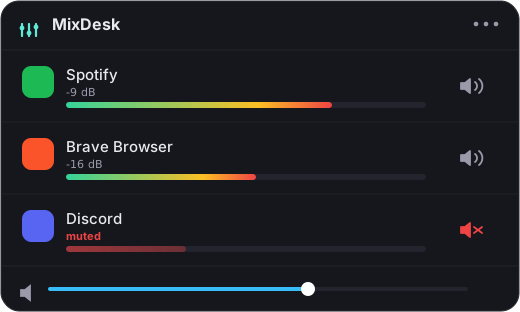
MixDesk is a maintained, notarized, driver-free take on that common case. Open the menu-bar panel and you get:
- Live meters for every app making sound, so you can see what’s going on at a glance. (How to see which apps are using audio)
- A real one-click mute for any app browsers, games, calls, anything. It diverts that app’s audio using Apple’s Core Audio process-tap API rather than faking it system-wide. (How to mute a specific app on a Mac)
- A volume slider and transport controls for music apps set the level, play, pause, and skip Spotify or Apple Music from the menu bar.
Because it’s built on the macOS 14.2 audio-tap API, there’s no virtual audio driver, no system extension, and nothing running in the kernel. It’s notarized, it processes everything on-device, and it keeps working across macOS updates because it uses Apple’s own public API instead of fighting it. That’s the whole point of switching off a legacy tool.
The honest gap
Here’s where I have to be square with you. MixDesk does not replace Sound Control feature for feature. It has no per-app equalizer, and it does not give you a variable fader for arbitrary apps. You can’t set Chrome to 40% in MixDesk the way Sound Control let you. For non-music apps, the controls are meters plus a true mute, not a sliding fader.
If a per-app EQ or a real fader on every single app is the specific thing you’re missing, the honest recommendation is SoundSource from Rogue Amoeba. It does full per-app volume, routing between devices, and per-app EQ, and it’s actively maintained. It costs more and does more, and if that’s genuinely what you need, it’s the right buy, not this.
Picking well
So the split is clean. If you leaned on Sound Control mainly for its equalizer or its fader-on-everything, go straight to SoundSource. If, like most people, you really just want to see what’s playing, silence the loud one, and keep a hand on your music, MixDesk covers that in a lighter, cheaper package with no driver, built for current macOS.
MixDesk is $9 once, not a subscription, with a 14-day free trial, at mixdesk.app. Requirements are macOS 14.2 or later on Apple silicon. Run it for an afternoon and see whether it covers what you actually miss about Sound Control.
Related reading
- How to control the volume of individual apps on a Mac
- A simpler, cheaper SoundSource alternative for Mac
Frequently asked questions
Is Sound Control still available for Mac?
Sound Control by Static Z Software is effectively legacy software. It's no longer actively developed, sales and support have gone quiet, and it relies on an audio-driver approach that modern macOS increasingly resists. Many people find they can no longer buy it, or can't get it running cleanly on macOS 14 and later, which is why they go looking for an alternative.
What did Sound Control do that made it popular?
Sound Control offered a true per-app volume slider for every application, plus a per-app equalizer and audio balance controls, all from the menu bar. That combination of a real fader on every app and built-in EQ is what people remember it for, and it's the thing any replacement gets measured against.
Does MixDesk replace Sound Control feature for feature?
No, and it's worth being clear about that. MixDesk gives you live level meters for every app, a real one-click mute for any app, and a volume slider plus transport controls for music apps like Spotify and Apple Music. It does not offer a variable fader for arbitrary apps or a per-app equalizer. If you specifically need EQ or a fader on every app, SoundSource is the honest recommendation.
Do I need to install a driver or kernel extension?
Not with MixDesk. It uses Apple's Core Audio process-tap API, introduced in macOS 14.2, so there's no audio driver, system extension, or kernel extension to install. Everything runs on-device. That's a meaningful difference from older tools like Sound Control that depended on a virtual audio driver.
MixDesk does this for you
A menu-bar mixer with live meters and per-app mute. Free for 14 days.
Try MixDesk free