A Mac volume mixer like the Windows one
If you just moved from Windows to a Mac, there’s a good chance you’ve already gone hunting for one specific thing and come up empty: the Volume Mixer. On Windows you right-click the speaker in the taskbar, and up pops a little panel with a separate slider for every app making sound. Turn the game down while leaving the call at full volume, or mute the browser without touching either. It’s one of those features you never think about until it’s gone.
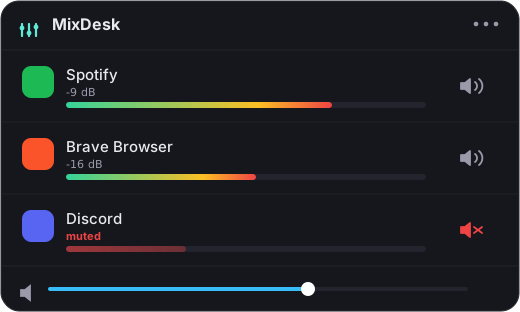
On macOS, that panel doesn’t exist. Click the volume control in the menu bar and you get a single slider that moves everything at once. So the natural question is: what’s the Mac equivalent, and how close can you actually get?
First, why the Mac never shipped one
The short version is that Apple chose not to, not that the Mac can’t. Under the hood, Core Audio has always known which app is producing which sound: the system tracks it. Apple just never put a mixer on top of that information. One volume key, one slider, done. It’s clean, and for a single stream of audio it’s genuinely enough.
The trouble is that one stream describes almost nobody’s Mac. You’ve got music, a call, a game, and a stack of browser tabs all at once, and a single slider can’t referee that. If you want the full reasoning, including why Apple’s own macOS 14.2 audio API proves it was never a technical wall, I wrote a whole piece on why macOS doesn’t have a volume mixer like Windows. This post is the practical follow-up: given that Apple won’t ship one, what’s the closest Windows-style tool you can install?
The closest thing: a menu-bar mixer
Because Apple left the gap, a handful of third-party apps fill it. The one I build, MixDesk, is designed to feel as much like that right-click mixer as macOS allows. It lives in the menu bar, and when you open it you see the thing you’ve been missing: a row of your currently-noisy apps, each with a live level meter so you can tell at a glance what’s actually making sound.
From there, two controls:
- A one-click mute for any app. Spotify, Chrome, a game, Zoom, whatever’s running: hit mute and that app goes silent while everything else keeps playing. This works for every app, not just music ones, using the audio-tap API Apple added in macOS 14.2. No driver, no kernel extension, nothing routed off your machine.
- A real volume slider for music apps. For Spotify and Apple Music, you get a proper variable fader plus transport controls (play, pause, skip), so you can nudge your music to 30% without touching the call you’re on.
That covers the everyday reasons people open the Windows mixer: something’s too loud, and you want to pull it down without pulling everything down.
Where it matches Windows, and where it honestly doesn’t
I want to be straight about this, because it’s the part that matters if you’re a switcher with specific expectations.
The Windows Volume Mixer gives you a variable slider for every single app: you can set Chrome to 40%, a game to 65%, and a call to 100%, all independently. That’s possible on Windows because its audio API exposes a per-app volume level.
macOS does not expose that. The 14.2 tap API lets an app read another app’s audio and divert it (which is what makes metering and mute possible), but there’s no public way to set an arbitrary app like a browser or a game to a partial volume. So MixDesk gives you:
- Music apps: a true variable slider, just like Windows.
- Everything else: mute-only, because a half-volume slider for those apps simply isn’t something macOS allows any app to do, not MixDesk, not anyone.
In practice, mute covers most of what people reach for: when one thing is too loud, you usually want it off, not at 60%. But if your mental model is that every app should get its own slider, it’s fair to know that no Mac tool can be a perfect 1:1 clone of the Windows mixer. For a deeper look at the options, see how to control the volume of individual apps on a Mac.
If you need variable sliders for non-music apps
There’s one honest caveat worth stating plainly. If your must-have is a variable level for browsers, games, and other non-music apps (the genuine Windows-mixer experience for everything), the tool that gets closest is SoundSource from Rogue Amoeba. It routes audio at a lower level and can do things MixDesk deliberately doesn’t. It’s also pricier and heavier. If you mostly want to see what’s making noise and mute the loud thing, with real sliders for your music, MixDesk is the lighter, cheaper fit.
The bottom line
The Mac never got a Volume Mixer like Windows because Apple decided one system slider was enough. A menu-bar app closes most of the gap: MixDesk shows a live meter and mute for every app, plus a variable slider for Spotify and Apple Music. It’s the nearest Windows-style mixer you can get without pretending macOS offers something it doesn’t.
If that sounds like the thing you’ve been missing since you switched, MixDesk has a 14-day free trial, then it’s $9 once. Requires macOS 14.2 or later on Apple silicon.
Related reading
- Why doesn’t macOS have a volume mixer like Windows?
- How to control the volume of individual apps on a Mac
Frequently asked questions
Does macOS have a Volume Mixer like Windows?
Not built in. macOS ships a single system volume and no per-app mixer in its interface. To get Windows-style per-app control you need a third-party menu-bar app such as MixDesk or SoundSource, since Core Audio tracks per-app sound but Apple never exposed a mixer for it.
Can I set one app to 40% and another to 100% on a Mac, like the Windows mixer?
For scriptable music apps like Spotify and Apple Music, yes. MixDesk gives a real variable slider. For everything else, such as browsers and games, macOS doesn't expose a variable per-app level, so MixDesk offers one-click mute instead of a partial slider.
What is the closest Mac equivalent of the Windows Volume Mixer?
A menu-bar app that shows a live level meter for every app plus a mute button for each, and a volume slider for music apps. MixDesk does exactly that. It's the nearest match to the right-click speaker mixer, though it isn't a 1:1 slider-for-every-app clone.
Why can't a Mac app just show a slider for every app like Windows does?
Windows exposes a per-app volume level in its audio API; macOS does not. macOS 14.2 added a tap API that lets an app read and divert another app's audio (which powers metering and mute), but there's no public way to set an arbitrary app to a partial volume.
MixDesk does this for you
A menu-bar mixer with live meters and per-app mute. Free for 14 days.
Try MixDesk free