The best menu-bar volume control for Mac
The volume control macOS gives you lives in the menu bar already. Click the speaker in Control Center, drag one slider, done. It’s fine right up until more than one thing is making noise, which on a modern Mac is basically always. Music, a call, a game, a wall of browser tabs. That one slider treats all of it as a single lump of sound.
So people go looking for a better menu-bar volume app. There are a few worth knowing about, and they’re not all trying to do the same thing. Here’s what I think actually matters when you’re picking one, and where each option lands.
What a good menu-bar volume tool should do
Before the round-up, the checklist. A menu-bar volume control earns its spot when it clears these:
- One-click access. It should live in the menu bar and open with a single click. If you have to launch a full window every time, it’s not really a menu-bar tool.
- Per-app awareness. The whole point is seeing sound app by app, not as one blob. At a minimum it should show you which apps are playing and let you act on them individually.
- No driver, no system extension. Older Mac audio tools worked by installing a virtual sound device that all your audio had to route through. That’s the thing that breaks after a macOS update and leaves you with no sound. A modern tool shouldn’t need it.
- Light and out of the way. It’s a utility. It should sit quietly, use almost nothing, and not turn into a mixing console you have to manage.
Hold each option up against that and the field sorts itself out quickly.
The options
SoundSource (Rogue Amoeba, around $47). The heavyweight. It gives every app a real variable volume slider, plus output routing, EQ, and effects. If you genuinely need to set Chrome to 40 percent and send it to a different output, this is the tool, and it’s very good. It’s also the priciest, and it’s more machinery than a lot of people want just to stop one tab from blasting them.
Background Music (free, open source). The budget answer. It does per-app volume and can duck other audio when you start a call. The trade-offs are that it installs a virtual audio device, and it’s community-maintained, so it can get finicky and lag behind new macOS releases. Free is free, but plan to fiddle.
eqMac (free with paid tiers). Really an equalizer first, with some volume features attached. Great if EQ is what you’re after; less focused if you just want to see and tame per-app sound.
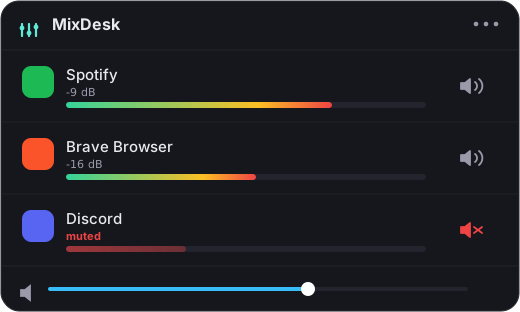
MixDesk ($9 once). The native, simple pick, and the one I build, so take the enthusiasm with a grain of salt. It lives in the menu bar, and when you open it you get a live level meter next to every app that’s playing sound, so you can see at a glance what’s making noise. Any app, you can mute on the spot without pausing anything else, and that mute is a real per-app mute, not a global one. For your music apps specifically, Spotify and Apple Music, it adds a volume slider and play/pause/skip controls right there in the panel.
The honest limitation, and why I’d still pick it
Here’s the line I won’t blur: MixDesk does not give every app its own volume slider. You can’t set a browser tab to 40 percent with it. What it does universally is meters plus instant mute: see what’s playing, silence any of it. The variable volume slider is reserved for the apps that expose scripting, namely Spotify and Apple Music. If a slider for every single app is your must-have, SoundSource is the honest recommendation and it’s worth its price.
But if you look at what people actually do at the menu bar all day, it’s which app is that sound coming from, and can I shut it up without stopping my music. That’s meters and mute, and that’s exactly the fast, one-click path MixDesk is built around. It uses the audio-tap API Apple added in macOS 14.2, so there’s no driver and no system extension, nothing that can knock out your sound after an update. Everything is processed on your Mac and never leaves it. It needs macOS 14.2 or later on Apple silicon.
The short version
The best menu-bar volume control is the one that matches what you reach for. Need full per-app faders and routing? Pay for SoundSource. Want free and don’t mind tinkering? Background Music. Want a simple, native menu-bar tool that shows you every app’s level, mutes anything in one click, and controls Spotify and Apple Music properly? That’s MixDesk. It’s $9 once, not a subscription, with a 14-day free trial at mixdesk.app.
Related reading
- How to control the volume of individual apps on a Mac
- How to see which apps are using audio on your Mac
MixDesk does this for you
A menu-bar mixer with live meters and per-app mute. Free for 14 days.
Try MixDesk free